Openstack Instance I/O Bufffer Error : A Ceph Blocklist Story
Openstack Instance I/O Bufffer Error : A Ceph Blocklist Story
It was a Monday morning when the power came back on. The UPS had held for as long as it could, but eventually the entire rack went dark. Ceph monitors, OSDs, compute nodes, everything. When the machines came back up, the cluster looked healthy. Ceph reported HEALTH_OK. OpenStack services were running. We even spun up a test VM and it booted fine.
Then the tickets started rolling in.
"My VM won't start"
Every existing VM in the environment was dead. Not just unresponsive, they were dropping into initramfs with I/O errors before even reaching the root filesystem. The console output was a wall of BusyBox messages ending with the dreaded:
No init found. Try passing init= bootarg.

BusyBox v1.36.1 (Ubuntu 1:1.36.1-6ubuntu3.1) built-in shell (ash)
Enter 'help' for a list of built-in commands.

(initramfs)
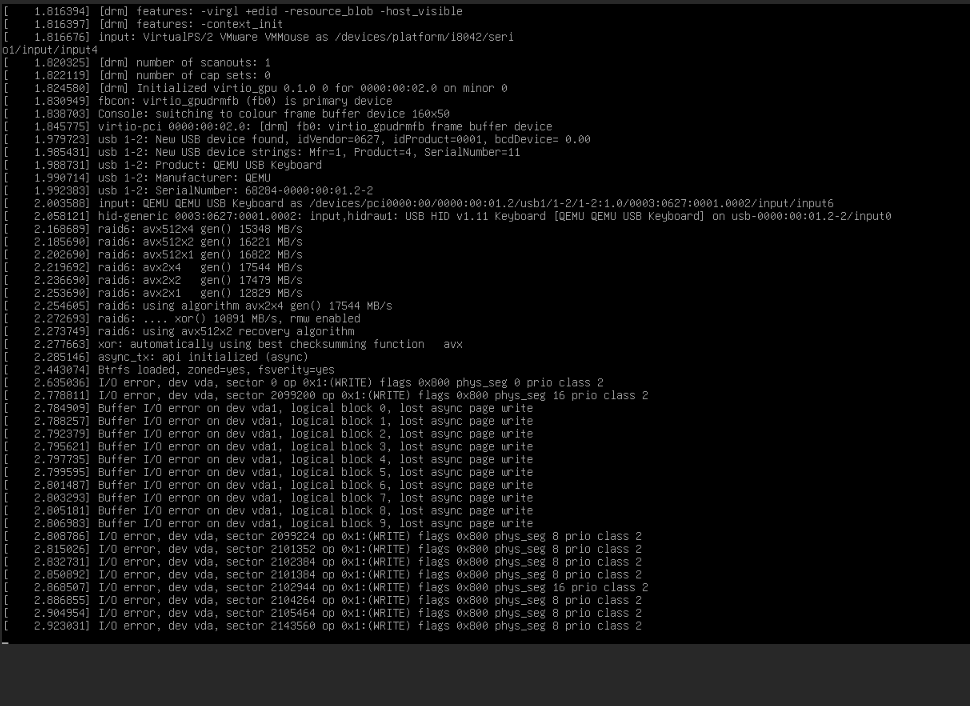
The VMs couldn't read their own disks. But here's the thing that made it confusing: new VMs worked perfectly. We could create a fresh instance, attach a volume, boot it up, no issues. Only the VMs that existed before the outage were affected.
That ruled out network problems, OSD failures, and pool corruption. Something was specifically wrong with the relationship between old VMs and their storage.
Down the Rabbit Hole
If you've worked with Ceph and RBD long enough, you develop a sixth sense for lock issues. Ceph's RBD exclusive locking is a safety mechanism. It prevents two clients from writing to the same image simultaneously, which would cause corruption. When a compute node connects to an RBD volume, it acquires an exclusive lock. When it disconnects cleanly, it releases it.
But our compute nodes didn't disconnect cleanly. They lost power.
$ ceph osd blocklist ls
10.88.10.91:0/3853293677 2026-05-06T08:59:47.102488+0000
10.88.10.90:0/316670229 2026-05-07T00:26:11.581329+0000
10.88.10.90:0/3783311129 2026-05-07T00:26:11.581329+0000
...
listed 14 entries
There it was. Both compute nodes, 10.88.10.90 and 10.88.10.91, were on Ceph's blocklist. When a client crashes without releasing its locks, Ceph blocklists it to prevent a zombie process from coming back and corrupting data. It's the right thing to do. But it also means that when those same nodes come back online with fresh processes, Ceph treats them as untrusted.
The old locks were still held by client IDs that no longer existed, on nodes that were now blocklisted. A perfect deadlock: the VMs needed the locks to boot, but the locks were held by ghosts.
The Fix
Confirming the Theory
We picked one affected volume and checked its lock state:
$ rbd lock list --pool volumes --image volume-48ed0d20-f065-4536-b3f2-eac5f3abc5be

There is 1 exclusive lock on this image.
Locker          ID                    Address
client.3406724  auto 135766063836400  10.88.10.91:0/3853293677
The address matched a blocklisted entry. The lock was held by a client that would never come back to release it.
Breaking the Lock
The syntax for force-removing an RBD lock is not intuitive (we hit rbd: unrecognised option '--locker' before finding the right incantation):
rbd lock remove volumes/volume-48ed0d20-f065-4536-b3f2-eac5f3abc5be \
  "auto 135766063836400" "client.3406724"
Positional arguments. Quotes around the lock ID because it contains a space. We verified:
$ rbd lock list --pool volumes --image volume-48ed0d20-f065-4536-b3f2-eac5f3abc5be
No locks on this image.
Rebooted the VM. It came up clean.
Scaling It Up
We had dozens of affected volumes. Doing this one by one wasn't going to work. Here's the script that saved our morning:
for vol in $(rbd ls volumes); do
  locks=$(rbd lock list volumes/$vol 2>/dev/null)
  if echo "$locks" | grep -q "client"; then
    echo "Removing lock on: $vol"
    lock_id=$(rbd lock list volumes/$vol | awk 'NR==3{print $2" "$3}')
    locker=$(rbd lock list volumes/$vol | awk 'NR==3{print $1}')
    rbd lock remove volumes/$vol "$lock_id" "$locker"
    echo "Done: $vol"
  fi
done
Then a hard reboot across the fleet:
for vm in $(openstack server list --all-projects -f value -c ID); do
  name=$(openstack server show $vm -f value -c name)
  status=$(openstack server show $vm -f value -c status)
  echo "Rebooting: $name ($vm) - Current status: $status"
  openstack server reboot --hard $vm
done
Every VM came back.
Clearing the Blocklist
After confirming all locks were released and VMs were healthy, we cleared the blocklist entries for the compute nodes:
ceph osd blocklist rm 10.88.10.90
ceph osd blocklist rm 10.88.10.91
A word of caution here: only do this after you're certain the crashed nodes won't come back online with stale state. If a zombie process reconnects while another client holds the lock, you're looking at potential data corruption.
Preventing This Next Time
The real question is: why didn't OpenStack handle this automatically? It turns out, our client.openstack Ceph user didn't have permission to manage the blocklist. Without allow command "osd blocklist" in its monitor capabilities, Nova couldn't clear stale entries on its own.
Grant OpenStack Ceph Blocklist Capabilities
To allow OpenStack to automatically handle these situations, grant the OpenStack Ceph client the necessary blocklist management permissions.
Step 1: Check current capabilities:
ceph auth get client.openstack
Step 2: Add blocklist capability (preserving existing OSD caps):
# First, save existing OSD caps
ceph auth get client.openstack -o /tmp/openstack.keyring

# Then update caps (this example assumes existing OSD caps)
ceph auth caps client.openstack \
  mon 'allow r, allow command "osd blocklist"' \
  osd 'allow class-read object_prefix rbd_children, allow rwx pool=images, allow rwx pool=volumes, allow rwx pool=vms, allow rwx pool=backups'
Note: Adjust the pool names and OSD caps according to your environment (e.g.,
vms,volumes,images).
Step 3: Verify the update:
ceph auth get client.openstack
Nova Configuration Tuning
We also tuned nova.conf on the compute nodes:
[libvirt]
hw_disk_discard = unmap
disk_cachemodes = network=writeback
rbd_io_timeout = 30
The rbd_io_timeout is the important one. It gives the RBD client more time to recover during transient issues instead of immediately failing I/O.
Lessons Learned
-
Ceph's blocklist is doing its job. It's protecting your data from split-brain scenarios. The problem isn't the mechanism, it's that unclean shutdowns leave orphaned locks behind.
-
New VMs working while old VMs fail is the signature. If you see this pattern after an outage, check
ceph osd blocklist lsimmediately. Don't waste time debugging network or OSD issues. -
Grant OpenStack blocklist permissions proactively. The
allow command "osd blocklist"capability lets Nova handle recovery automatically. Without it, you're doing manual lock surgery at 7am. -
The
rbd lock removesyntax is a trap. It uses positional arguments with quoted strings. The--lockerflag doesn't exist in many versions. Save yourself the frustration and bookmark the correct form:rbd lock remove <pool>/<image> "<lock_id>" "<locker>". -
Test your power failure recovery. We had monitoring, backups, and HA configured. None of that mattered because the failure mode was a logical lock, not a hardware failure. Pull the plug in staging once in a while.